# Pit Officer 0.2.1 and 0.3.0: live IBKR, Binance and eToro, open P&L limits
Pit Officer 0.2.1 adds Interactive Brokers, Binance and eToro trading connections, live trading on every venue, a mode for trading from zero, and P&L bounds that count open positions; 0.3.0 adds live-account steps per venue. A breached bound rejects the next order and blocks new orders, exits included.
Canonical:
Author: Anna Palchukovsky
Description: A loss limit on realized P&L lets a bot buy into an open loss. Pit Officer 0.2.1 and 0.3.0 bound open P&L and send live orders to IBKR, Binance and eToro.
Published: 2026-11-06T22:30:46+02:00
Updated: 2026-11-06T22:30:46+02:00
Tags: pit-officer, risk-controls, kill-switch, market-data, trading-bots
Your bot holds 0.5 BTC bought at 60,000 USDT, BTC falls to 56,800, and a
-1,500 limit on realized P&L passes its next buy: with no sale and fees aside,
it is 0.
:::stat
**-1,600 USDT**
The open loss at 56,800, which a realized-only limit sees as 0. Illustrative
prices.
:::
:::timeline
1. **The bot buys 0.5 BTC at 60,000 USDT.** Realized P&L is 0.
2. **BTC falls to 57,200.** The position is 1,400 USDT under water; nothing is
sold.
3. **BTC falls to 56,800.** The open loss is 1,600 USDT; realized P&L is
still 0.
4. **The bot buys more into the fall.** The -1,500 limit on realized P&L sees
0 and passes the order.
:::
Pit Officer 0.2.1 and 0.3.0 close that gap and a second one: a pre-trade check
protects only the orders that go through it, and Officer 0.1.0 sent orders to
Alpaca alone.
:::cards
- **Four venues take orders, paper or live.** Interactive Brokers (IBKR),
Binance and eToro join Alpaca, each with its steps for a live connection in
the setup dialog.
- **Open losses count.** An unrealized P&L bound values the account's
positions at the current price; a total P&L bound adds realized P&L to that.
A breach rejects the next order and blocks the account.
- **The block stops exits too.** It refuses every new order Officer checks for
the account until a person acts, so plan the exit before you set the bound.
- **Prices and orders are separate lists.** An unrealized bound needs a price
for every open position it values, and eToro, a trading venue, is not a
price source.
- **Trading from zero.** A Spot Funds mode refuses no order on funds, so you
can start without loading balances into Officer; P&L bounds still apply.
:::
## What changed in 0.2.1 and 0.3.0?
**0.2.1 brings the new venues, live trading, P&L bounds on open positions and
trading from zero; 0.3.0 brings each venue's live-account steps, building
blocks for your own panel, and one breaking change for API clients that read
price sources.**
:::more[The full change list, version by version]
By the compare of the tags
([v0.1.0...v0.2.1](https://github.com/openpitkit/officer/compare/v0.1.0...v0.2.1),
[v0.2.1...v0.3.0](https://github.com/openpitkit/officer/compare/v0.2.1...v0.3.0)),
0.2.1, released 2026-11-02, brought:
- Trading connections for Interactive Brokers, Binance and eToro.
- Live trading on every venue: paper and live connections are created, enabled
and restored alike.
- A Spot Funds limit mode, "Accounting without blocking", for trading from
zero.
- Unrealized and total P&L bounds, from the OpenPit engine 0.11.0.
0.3.0, released 2026-11-06, brought:
- Live-account steps for each venue in the trading connection setup.
- Building blocks for a host application's own panel: login screen, page
frame, error banner, shared host router and a published stylesheet.
- Breaking: market-data instance responses no longer carry the `credentials`
field, which had always come back as an empty string. A client that reads it
must stop; the `secrets` flags say which secrets are stored.
The full notes are on the
[v0.2.1](https://github.com/openpitkit/officer/releases/tag/v0.2.1) and
[v0.3.0](https://github.com/openpitkit/officer/releases/tag/v0.3.0) release
pages.
:::
## Which venues send orders, and which only give prices?
**Orders and prices are configured separately, and the lists differ: eToro
takes orders but gives no prices.** A trading connection sends orders to a
venue account; a price source is where Officer reads quotes.
:::matrix
| Venue | Sends orders | Gives prices |
| --- | --- | --- |
| Alpaca | ✓ [1] | ✓ |
| Interactive Brokers | ✓ [2] | ✓ |
| Binance | ✓ [2] | ✓ |
| eToro | ✓ [2] | ✗ [3] |
| Bybit, Coinbase, Kraken, OKX | ✗ | ✓ |
| OANDA, Finnhub | ✗ | ✓ |
| BYO (manual marks) | ✗ | ~ [4] |
1. Since 0.1.0, whose
[provider list](https://github.com/openpitkit/officer/blob/v0.1.0/internal/trading/providers.go)
holds Alpaca alone and whose
[backend](https://github.com/openpitkit/officer/blob/v0.1.0/framework/backend/backend_trading.go)
refuses a live connection; live since 0.2.1. The
[trading provider list](https://github.com/openpitkit/officer/blob/v0.3.0/internal/trading/providers.go)
at v0.3.0 and the API notes at
[v0.2.1](https://github.com/openpitkit/officer/blob/v0.2.1/docs/api.md#trading)
and [v0.3.0](https://github.com/openpitkit/officer/blob/v0.3.0/docs/api.md#trading).
2. Since 0.2.1, paper and live; same sources.
3. No eToro price source at v0.3.0: the
[market-data provider list](https://github.com/openpitkit/officer/blob/v0.3.0/internal/marketdata/providers.go).
4. The marks you send; a mark stays where you set it. Same list.
:::
Once a P&L bound values open positions, an eToro account needs its prices
from another source, mapped to the same assets and quoted in the account
currency, or the bound has nothing to value a position with. A manual mark
stops following the market until you change it.
Two venues shift what a bound sees: Officer does not book eToro's close-side
fees, and IBKR can hold back older executions, so a fill may be missing from
the value ([the venue notes](#what-does-each-venue-need)).
## How do you take a venue live?
**Create the connection in live mode and send through the live route: the
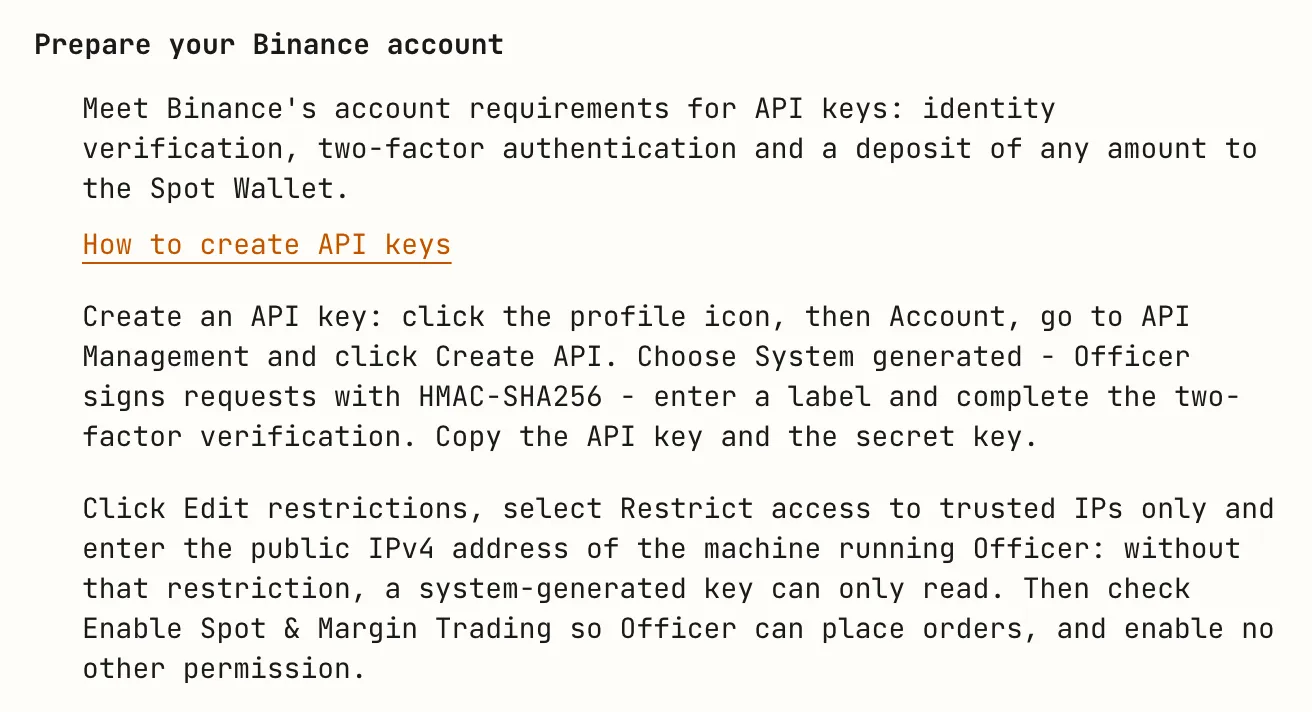
checks and the outcomes are those of the paper route.** Since 0.3.0 the setup
dialog lists the venue's own steps for a live connection, also in
[the venue notes](#what-does-each-venue-need). On
Binance, the key must be restricted to the trusted IP of the machine running
Officer, or, under Binance's default security controls, it can only read:
## How does an unrealized P&L bound stop an account?
**When a quote alone pushes the open loss past its bound, nothing happens
until the next order: it is rejected and the account is blocked.**
:::more[Unrealized P&L, total P&L and a P&L bound]
**Unrealized P&L** is what closing the account's whole position at the current
price would add to realized P&L. **Total P&L** is realized plus unrealized. A
**P&L bound** is a lower limit, an upper limit or both on one of these values,
in a currency you name; it limits the account only in the account's currency
([what a bound needs](#what-does-a-pl-bound-need)). When the value leaves its
bounds, the next check blocks the account, and an order that runs it is
rejected
([Spot Funds](https://wiki.openpit.dev/Spot-Funds/#unrealized-and-total-pnl-bounds)).
:::
An account named swing, in USDT, holds 0.5 BTC at an average entry of 60,000 under a
-1,500 unrealized bound, with prices from Binance. The mark falls while realized
P&L stays at 0:
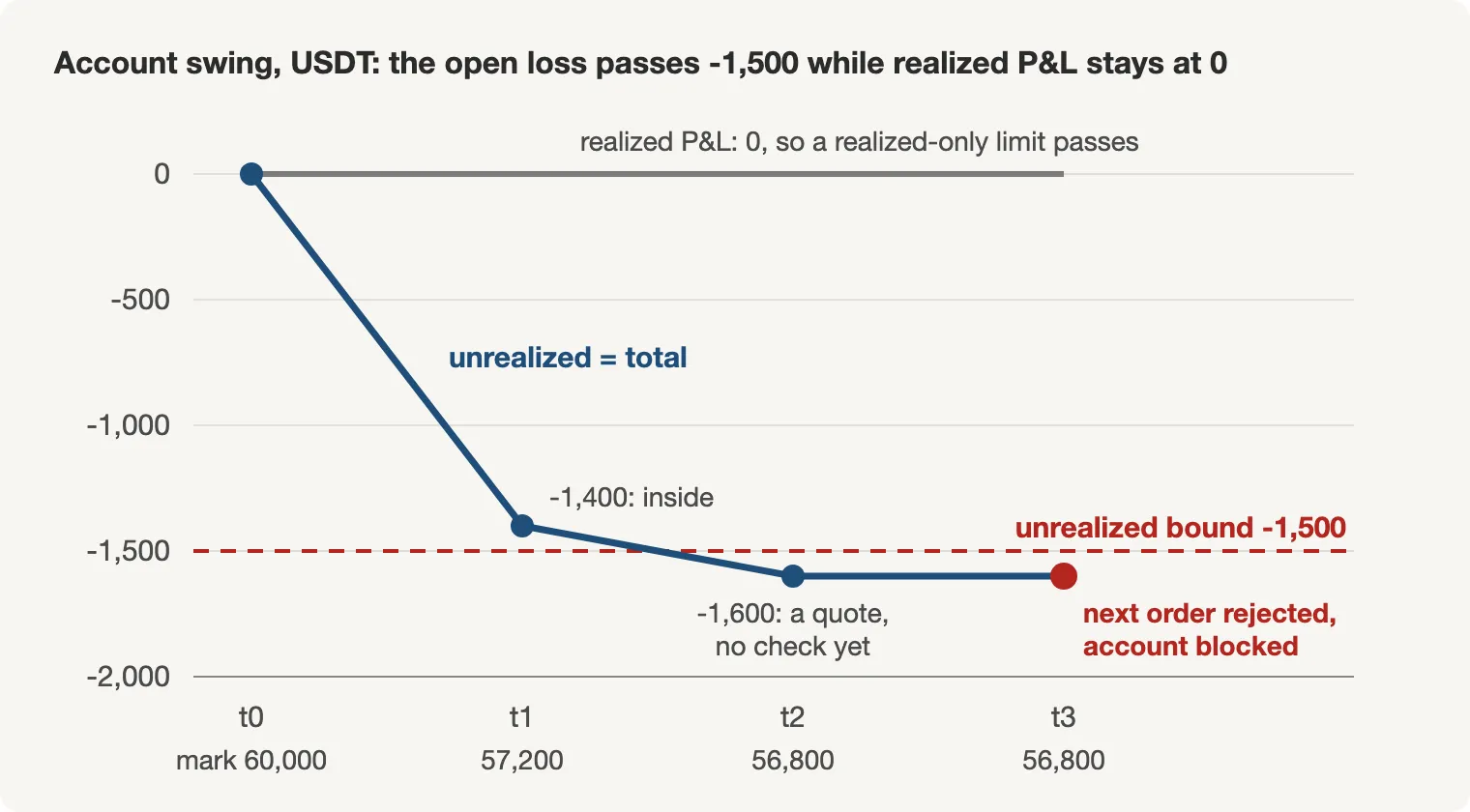
At t2 the account is already past the bound, but quotes arriving do not run
the check; the next order does, and so do a fill that trades or carries a fee
and a change to the bound in force
([OpenPit 0.11.0](https://github.com/openpitkit/pit/blob/v0.11.0/crates/openpit/src/pretrade/policies/spot_funds/pnl.rs)).
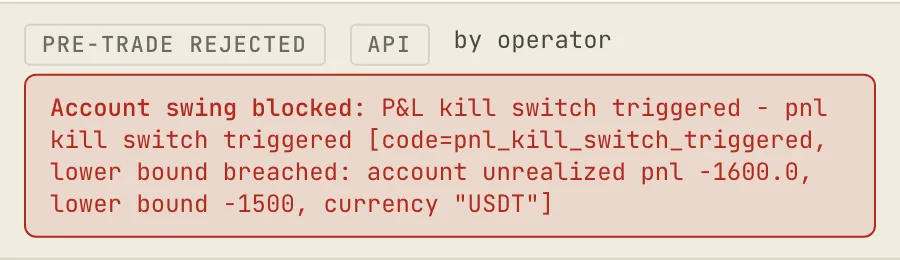
At t3 the bot
tries to average down: Officer rejects the order, sends nothing to Binance, and
blocks the account. The panel's order timeline names the breach:
The REST calls and Officer's full answer are in
[the code](#where-is-the-code).
## What happens after the account is blocked?
**Every new order Officer checks for the account is refused, the closing sell
included, until an operator unblocks it in the panel or through REST. The
bound is a halt, not a stop-loss: decide who exits, and how, before you set
it.**
:::outcomes
- **Exit at the venue.** Then book the close in Officer as a priced drop copy
with its fill, which a block does not stop, or the bound keeps valuing a
position you no longer hold.
- **Exit through Officer.** Widen every P&L bound the account breaches,
unblock the account, send the close, and tighten the bounds again.
- **Widen or unblock alone.** Widening leaves the block latched; after an
unblock alone, the next order, a closing sell included, is rejected and
blocks again while the value stays past the bound.
:::
The block lives in Officer, not in the bot, so a bot restart does not clear it
([why a halt sits outside the bot](/blog/trading-bot-crashed-open-position/)).
Over MCP, an AI agent cannot lift it: that counts as loosening risk.
:::more[What the block stops, and what each exit involves]
- The block refuses every new order Officer checks for the account, before any
policy runs; it gates new orders only, and account adjustments and drop
copies still apply
([Account Blocking](https://wiki.openpit.dev/Account-Blocking/)).
- Lifting it is a person's call: Unblock in the panel, or
`POST /api/v1/accounts/swing/unblock?missingAccount=reject`.
- Unblocking alone does not reopen trading: the engine checks the existing
position before the proposed sale, so while the value is still past the
bound the next order, a closing sell included, is rejected and blocks again
(from the engine source at 0.11.0).
- Officer
[reconciles](https://github.com/openpitkit/officer/blob/v0.3.0/docs/api.md#trading)
the orders that reached its send step, not a close placed at the venue, so
book that close as a drop copy with a limit price
(`POST /orders/drop-copy/submit?missingAccount=create`) and report its fill
against that order.
- Exiting through Officer, widen every bound the account breaches: at t3, with
a total bound also set, the unrealized and the total alike.
- After the close the loss is realized, so a realized or total bound restored
to its old level blocks the account again if the realized loss still
breaches it.
:::
## When does a total P&L bound fire before either part does?
**When the realized and the open losses are each inside their own bound but
their sum is not.** With realized, unrealized and total bounds all at -1,500
USDT, a realized -800 and an unrealized -900 pass, and the total of -1,700
rejects the next order and blocks the account:
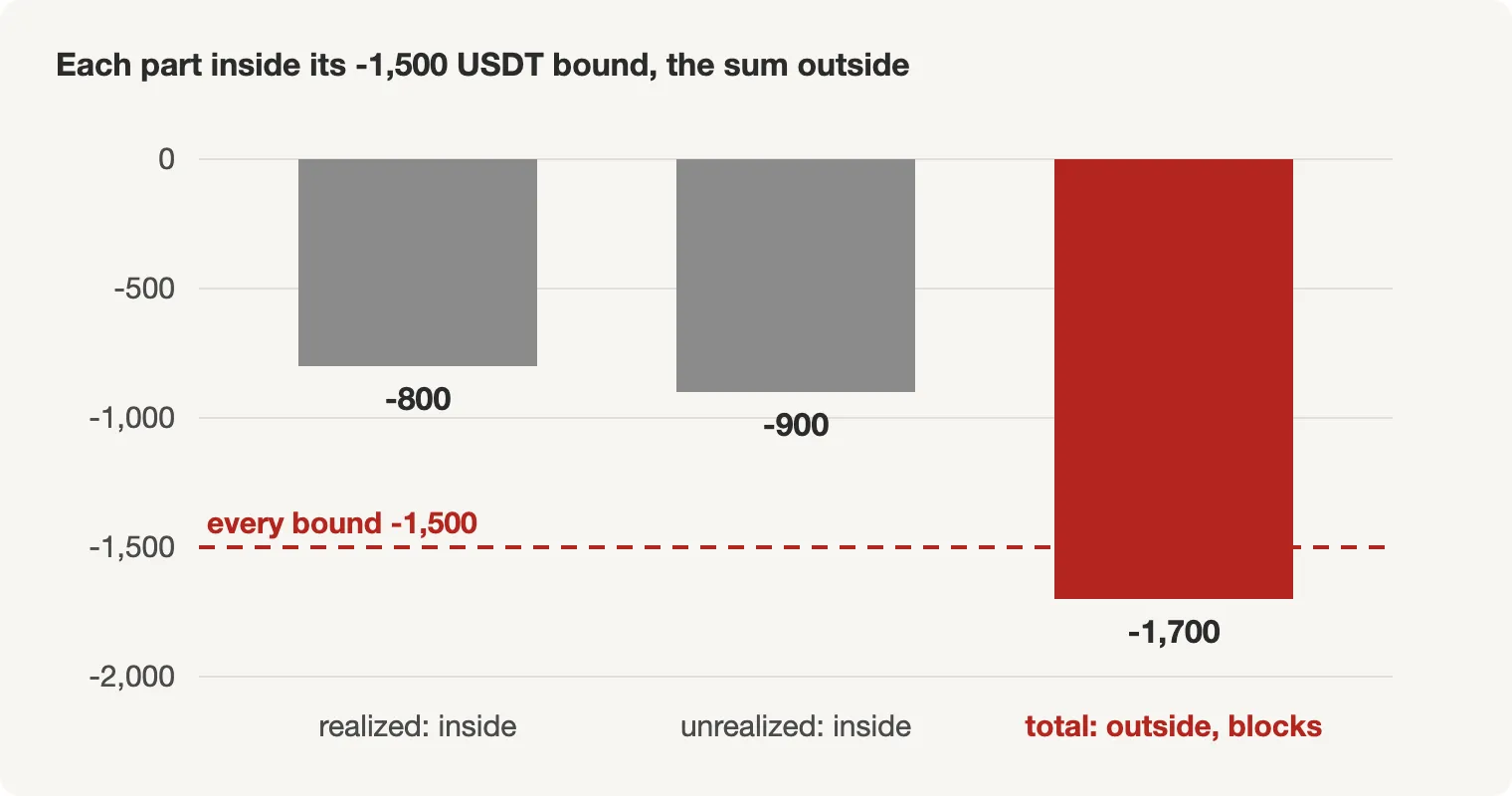
Realized bounds are checked first, then the unrealized, then the total; the
first breach wins.
## What does a P&L bound need?
**An unrealized or total bound needs a price, an account currency and a cost
basis for every open position it values, and a bound in the account's
currency** (Officer's
[API notes](https://github.com/openpitkit/officer/blob/v0.3.0/docs/api.md#spot-funds-pl-bounds),
[Spot Funds](https://wiki.openpit.dev/Spot-Funds/#unrealized-and-total-pnl-bounds)).
:::cards
- **A price for every open position.** When an open position needs a mark and
none is stored, the value halts, and the next order is rejected and blocks
the account. An asset already in the account currency counts at one.
- **An account currency.** Valuing an open position needs an effective one;
without it the value halts, and a bound that applies blocks the account.
Officer warns about such accounts, and the panel
shows it while trading from zero.
- **A bound in the account's currency.** A group or global bound in another
currency is skipped for that account, so it does not protect it; an account
bound in another currency blocks the account.
- **A cost basis.** When you seed a position by adjustment, set its average
entry price, so the bound can value it.
:::
## Where does a P&L bound fall short?
**An unrealized or total bound checks the latest mark it holds, for one account
at a time; how fresh that mark is, and what the fill costs, stay yours to
watch.**
:::cards
- **A recent price is your job.** Officer marks a quote stale after its
[freshness window](https://github.com/openpitkit/officer/blob/v0.3.0/httpapi/openapi.yaml),
but the engine values positions with the mark it still holds and, by its
documentation, accepts an expired one for this calculation. While that mark
stays stored, a dead feed freezes the value instead of stopping the bound:
keep the staleness checks from
[How to handle stale market data in a trading bot's loss limits](/blog/stale-market-data-trading-bot/).
- **Mark, not fill.** The value uses the quote, with no bid/ask or slippage
adjustment: a worse fill can realize a larger loss than the mark implied.
- **A group bound is per account.** A bound on an account group is the
fallback each member account inherits, compared with that account's own
P&L, not the sum across the group. Bots that share one Officer account share
one value, which
[Multiple trading bots on one account](/blog/multiple-trading-bots-one-account/)
needs.
:::
## How do you trade from zero?
**Switch the Spot Funds limit mode to Accounting without blocking: Officer
records every hold but refuses no order on funds, so you need not mirror your
venue balances into Officer before the first order.** P&L bounds, rate limits
and order-size limits still apply. The mode is one global setting; it applies
at once, and first-run setup now asks for it.
The costs:
- Officer no longer stops an order the account cannot pay for; the venue does.
Balances and positions may go negative.
- Holdings you had at the venue are outside every P&L bound until you seed
them by adjustment with an average entry price; selling them unseeded takes
Officer's position negative.
- Switching back to Check funds resets no balance: orders that need funds
against a negative balance are refused again.
:::more[The two modes in the API, and what an agent may switch]
"Check funds" (`enforce`, the default) refuses an order that lacks funds or
holdings in Officer's ledger. "Accounting without blocking" (`track_only`) does
not refuse on funds but records every hold. Set it with
`PUT /limits/spot-funds-limit-mode` and
`{"scope": "global", "mode": "track_only"}`. An AI agent cannot switch to
`track_only` over MCP; it can switch back to `enforce`.
:::
## Can you build your own panel on Officer?
**Yes: for a team that composes its own Officer from the importable packages,
0.3.0's web framework exports the login screen, the page frame and other
building blocks.**
:::more[What the web framework exports, and how to build it]
The web framework at 0.3.0
[exports](https://github.com/openpitkit/officer/blob/v0.3.0/web/src/framework/index.ts)
the login screen, page frame, error banner, text field, button, retry
countdown and theme provider, shares the host application's router through
peer dependencies, and exports its stylesheet for the host to import once.
The library is built from the repository with `npm run build:lib`; see the
[web framework notes](https://github.com/openpitkit/officer/blob/v0.3.0/web/README.md).
:::
## How do you upgrade from 0.1?
**Back up first, then pull the new image and recreate the container with the
same volume and the same extra settings you gave before, a master key for
example.**
:::more[The backup, the commands and what the upgrade keeps]
Back up on the Service page: Database, Database backup, Export. When a version
changes how it stores data, Officer keeps a copy of the database in the volume
and offers it for download on the Service page. Existing agent tokens,
legacy `pit_mcp_...` ones included, stay valid until you regenerate them.
The
[upgrade steps](https://github.com/openpitkit/officer/blob/v0.3.0/docs/quickstart.md#upgrade-officer),
pinned to this version:
```sh
docker pull ghcr.io/openpitkit/officer:0.3.0
docker stop pit-officer
docker rm pit-officer
docker run -d --name pit-officer --restart unless-stopped -p 127.0.0.1:8787:8787 -v pit-officer-data:/data ghcr.io/openpitkit/officer:0.3.0
```
Add the extra settings you passed before to `docker run`.
:::
## Checklist
- Every open position under a P&L bound has an enabled price source mapped to
it in the account currency; an eToro account takes prices from another venue.
- Every account under a bound has an account currency, every seeded position
an average entry price, and every group or global bound is in the currency
of each account it should cover.
- You know who exits a breached account and how, before you set the bound.
- Your bot checks price age itself; Officer's bound values the latest quote.
- Live keys follow the venue's steps in the setup dialog, with trading
permission only.
- MCP tools that change state stay disabled unless you enabled them by name.
- A backup exists from before the upgrade.
## What does each venue need?
**Each venue's order rules and its steps before a live connection works.**
:::more[Sources for the venue notes]
What Officer expects: the
[API notes](https://github.com/openpitkit/officer/blob/v0.3.0/docs/api.md#trading)
and the
[provider code](https://github.com/openpitkit/officer/blob/v0.3.0/internal/trading/providers.go)
at v0.3.0. The live steps: the panel's
[trading setup text](https://github.com/openpitkit/officer/blob/v0.3.0/web/src/i18n/locales/en/trading.json)
at v0.3.0.
:::
:::more[Interactive Brokers]
- **Connection.** Officer trades through a running TWS or IB Gateway session
over the TWS API, so the connection takes a host, a port and an optional
client ID, not an API key. An order goes out only through an access grant
bound to an IB account ID. Time in force is `day`, `gtc` or `ioc`.
- **Executions.** By default IB delivers executions only since midnight, and
through IB Gateway that cannot be changed
([IBKR](https://interactivebrokers.github.io/tws-api/executions_commissions.html));
when reconciliation needs older ones, the order stays pending with a
diagnostic, and Officer never infers a fill. Until it is resolved, a P&L
bound values a position without that fill; TWS, unlike IB Gateway, can
return up to 7 days through its Trade Log setting.
- **Live.** Log in to IB Gateway or TWS with the live username, enable socket
clients, clear the read-only API setting so orders are accepted, and use the
live socket port (IB Gateway 4001, TWS 7496).
:::
:::more[Binance]
- **Orders.** Spot only, with quantity orders only. Paper connections use the
Spot Testnet. A limit order takes `GTC`, `IOC` or `FOK`; a market order
takes an empty route.
- **Live.** A system-generated key restricted to the trusted IP of the machine
running Officer, with Spot trading and no other permission, as the setup
dialog above shows. A changed public IP stops live orders until you update
the key's trusted IP.
:::
:::more[Alpaca]
Live trading needs an approved, funded live account, and live API keys, which
differ from paper keys.
:::
:::more[eToro]
- **Orders.** A market order, or an IOC limit buy. A buy needs a real, long,
leverage-1 instrument configuration, and a sell closes an existing long
position.
- **Fees.** The eToro close response Officer 0.3.0 reads carries no fee, so
close-side fees are not booked: Officer's realized and total P&L omit them,
so a lower bound on either fires that much later than the real loss.
- **Prices.** Officer has no eToro price source at 0.3.0; map the account's
assets to another one.
- **Live.** A user key for the Real environment with Write permission; API key
management appears only once the account is verified.
:::
:::more[Officer's API for these features]
- **Live orders.** Create the connection in `live` mode and send through
`POST /orders/send-live` or the MCP tool `send_live_order`; the outcomes
(`acknowledged`, `refused`, `unknown`) are those of the paper route
([Trading](https://github.com/openpitkit/officer/blob/v0.3.0/docs/api.md#trading)).
- **P&L bounds.** `PUT /limits/spot-funds-unrealized-pnl-bounds` and
`PUT /limits/spot-funds-total-pnl-bounds` take the same body; a breach
rejects with `pnl_kill_switch_triggered`
([Spot Funds P&L bounds](https://github.com/openpitkit/officer/blob/v0.3.0/docs/api.md#spot-funds-pl-bounds)).
In the panel, the unrealized bound is the Unrealized Profit and Loss Kill
Switch policy.
- **Accounts without a currency.** `GET /limits/spot-funds-limit-mode` lists
those a bound applies to in `accountsWithoutCurrency`
([Spot Funds limit mode](https://github.com/openpitkit/officer/blob/v0.3.0/docs/api.md#spot-funds-limit-mode)).
- **Dry run.** `POST /orders/check` reports the breach without latching the
block, so a bot can ask before it sends
([OpenAPI](https://github.com/openpitkit/officer/blob/v0.3.0/httpapi/openapi.yaml)).
- **Agents.** Over MCP, `set_limit` can add a bound or make one stricter;
loosening or removing one, and unblocking an account, are refused
([MCP tools](https://github.com/openpitkit/officer/blob/v0.3.0/docs/api.md#mcp-tools)).
All at v0.3.0.
:::
## Where is the code?
:::more[The open-loss scenario in REST: set the bound, send the order, read the rejection]
The setup: account `swing`, currency USDT, a Binance paper connection and a
Binance price source mapping BTCUSDT to BTC/USDT. The account holds 0.5 BTC at
an average entry of 60,000 USDT. The connection is the only enabled paper
destination, `swing` has access to it, BTCUSDT is an enabled instrument on it,
and the order passes Binance's own pre-check, so Officer's risk decision is
what answers. The prices are illustrative. On paper, fills come from the
[Spot Testnet](https://github.com/openpitkit/officer/blob/v0.3.0/internal/trading/providers.go)
and marks from the
[mainnet stream](https://github.com/openpitkit/officer/blob/v0.3.0/internal/marketdata/binance.go),
so seed the position by adjustment at a mainnet price, or expect the gap
between the two in the unrealized value.
Set the bound:
```sh
# Pit Officer 0.3.0, token access mode. Request shape from docs/api.md and
# httpapi/openapi.yaml at v0.3.0.
curl -X PUT 'http://127.0.0.1:8787/api/v1/limits/spot-funds-unrealized-pnl-bounds?missingAccount=reject' \
-H "Authorization: Bearer $PIT_API_TOKEN" \
-H 'Content-Type: application/json' \
-d '{"scope": "account", "account": "swing", "accountGroup": "",
"currency": "USDT", "lowerBound": "-1500", "upperBound": ""}'
```
The answer is the stored barrier under `spotFundsUnrealizedPnlBoundsLimit`.
After the mark falls to 56,800, the bot tries to average down at t3:
```sh
curl -X POST 'http://127.0.0.1:8787/api/v1/orders/send-paper' \
-H "Authorization: Bearer $PIT_API_TOKEN" \
-H 'Content-Type: application/json' \
-d '{"account": "swing", "baseAsset": "BTC", "quoteAsset": "USDT",
"side": "buy", "amountKind": "quantity", "amountValue": "0.1",
"price": "56800",
"destination": {"route": {"timeInForce": "GTC"}}}'
```
Officer answers `201` with a rejected decision and sends nothing to Binance
(`venueSend` is absent on a reject). With the signature fields elided, for a
mark of exactly `56800` (a quote with more decimal places adds them to the P&L
value in `details`):
```json
{
"signedApproval": "...",
"keyId": "...",
"id": "...",
"verdict": "reject",
"reasons": [
{
"code": "pnl_kill_switch_triggered",
"scope": "account",
"policy": "SpotFundsPolicy",
"reason": "pnl kill switch triggered",
"details": "lower bound breached: account unrealized pnl -1600.0, lower bound -1500, currency \"USDT\""
}
]
}
```
:::
## What else do people ask?
:::more[Does Pit Officer close my position when the P&L bound is breached?]
No. It rejects the next order and blocks the account; the position stays open
at the venue. Closing it is a human decision: at the venue, then booked in
Officer as a priced drop copy with its fill, or through Officer after you
widen every P&L bound the account breaches and then unblock the account.
Widening alone leaves the block in place, and an unblock alone is followed by
another block while the value stays past the bound.
:::
:::more[Can I trade on eToro with an unrealized P&L bound?]
Yes, if every open position has a price from another price source, mapped to
the same assets; a BYO mark you send counts, and stays fixed until you change
it. Officer has no eToro price source at 0.3.0, and an account with an open
position the bound cannot value is blocked on its next order.
:::
:::more[Can an AI agent remove the limit that stopped it?]
Not over MCP, where a bound can only be added or tightened; loosening it,
removing it or unblocking the account is refused. The panel and REST are not
restricted, so an agent that holds the API token, or can run commands as you
or reach Docker, can still unblock and loosen: keep the API token out of the
agent's environment
([quickstart](https://github.com/openpitkit/officer/blob/v0.3.0/docs/quickstart.md)).
:::
## Where to go next
- [Pit Officer 0.1.0](/blog/pit-officer-0-1-0/): the first beta and its
order path.
- [How to handle stale market data in a trading bot's loss limits](/blog/stale-market-data-trading-bot/):
telling a quiet market from a dead feed before trusting a P&L number.
- [What happens if my trading bot crashes with a position open?](/blog/trading-bot-crashed-open-position/):
a halt outside the bot, and what the venue keeps doing while it is down.
- [Multiple trading bots on one account](/blog/multiple-trading-bots-one-account/):
one admission point for every bot that trades the account.
- Pit Officer: [API notes](https://github.com/openpitkit/officer/blob/v0.3.0/docs/api.md),
[quickstart](https://github.com/openpitkit/officer/blob/v0.3.0/docs/quickstart.md).
- OpenPit SDK: [Spot Funds](https://wiki.openpit.dev/Spot-Funds/),
[Account Blocking](https://wiki.openpit.dev/Account-Blocking/).