Pit Officer 0.1.0: pre-trade risk checks outside your trading bot
A limit kept in your bot or an AI agent's prompt can fail when they do. Pit Officer 0.1.0 checks every order in a separate service before it reaches Alpaca.
Contents
Your bot caps every order at 100 shares, and the cap lives in the bot: a bug sends 500 anyway, and an AI agent given the cap in its prompt can be talked into 10,000.
- You put the rule in the prompt. “Never more than 100 shares.”
- The agent is talked round. It decides to buy 10,000 shares of AAPL.
- It sends the order to the broker. Nothing between the agent and the broker knows the rule.
- The order goes out. 1.9 million USD, a hundred times the cap.
Pit Officer 0.1.0, the first beta, moves that decision out: a separate service on your own machine where the OpenPit engine checks every order before Officer sends it to your broker. An order over the cap comes back rejected, and nothing is sent.
- The decision leaves the bot. Orders reach the broker through Officer, and the OpenPit engine checks each one before it is sent. A rejected order is never sent.
- Four kinds of limit at this release: order rate, order size by quantity or notional, Spot Funds P&L bounds, and a block on an account or an account group.
- An agent gets only the tools you enable. Every MCP tool that changes state ships disabled, and Officer refuses any MCP call that would loosen risk state - lift a block, raise a cap, grant trading access - whatever the agent was told.
- The limits bind only if the bot has no other road to the broker. Officer holds the Alpaca keys; the bot holds an Officer token.
- 0.1.0 is a beta: one connection type (Alpaca), orders sent to paper accounts, and no database migration between versions.
What does Pit Officer 0.1.0 do?
It sits between whatever sends your orders and your Alpaca account, and lets an order through only after the OpenPit engine has accepted it.
Officer runs on your own computer from one Docker command, which publishes it on that computer’s loopback address. It has three ways in, each with its own credential when you choose token access in the first-run setup:
- You, in the web panel. A panel password, then a session.
- Trading software, over REST. An API token.
- An AI agent, over MCP. An agent token. It works on the agent’s own surface only, so an agent cannot reach the REST routes its MCP tools do not expose.
The checks are the OpenPit engine’s own policies; Officer 0.1.0 is built on
OpenPit 0.10.0
(go.mod at v0.1.0).
Terms this post uses
A pre-trade check is a decision, made before an order leaves for the
venue, on whether it may go out at all. A trading connection is Officer’s
link to one broker account: the provider, the mode (only paper at this
release), and the credentials, which Officer accepts on write and never returns
(API notes, Trading).
The address, the three surfaces and their credentials
The Docker command publishes Officer on the loopback address
http://127.0.0.1:8787, so it answers this computer and not the network; on
Linux, Docker Engine older than 28.0.0, or older than 28.3.3 with firewalld,
can still let other machines on the local network reach it
(README,
quickstart).
The same address serves all three surfaces (quickstart, API notes, Mount points):
- Web panel at
/: the panel password, then a session cookie. - REST at
/api/v1, with its reference at/docs: the API token,Authorization: Bearer pit_api_.... - MCP over HTTP at
/mcp: the agent token,Authorization: Bearer pit_mcp_....
The agent token sent to /api/v1 is refused with 403 wrong_token. The binary
also runs as a local stdio MCP server, pit-officer mcp, for MCP clients that
launch their servers themselves
(configuration reference).
Where does a rejected order stop?
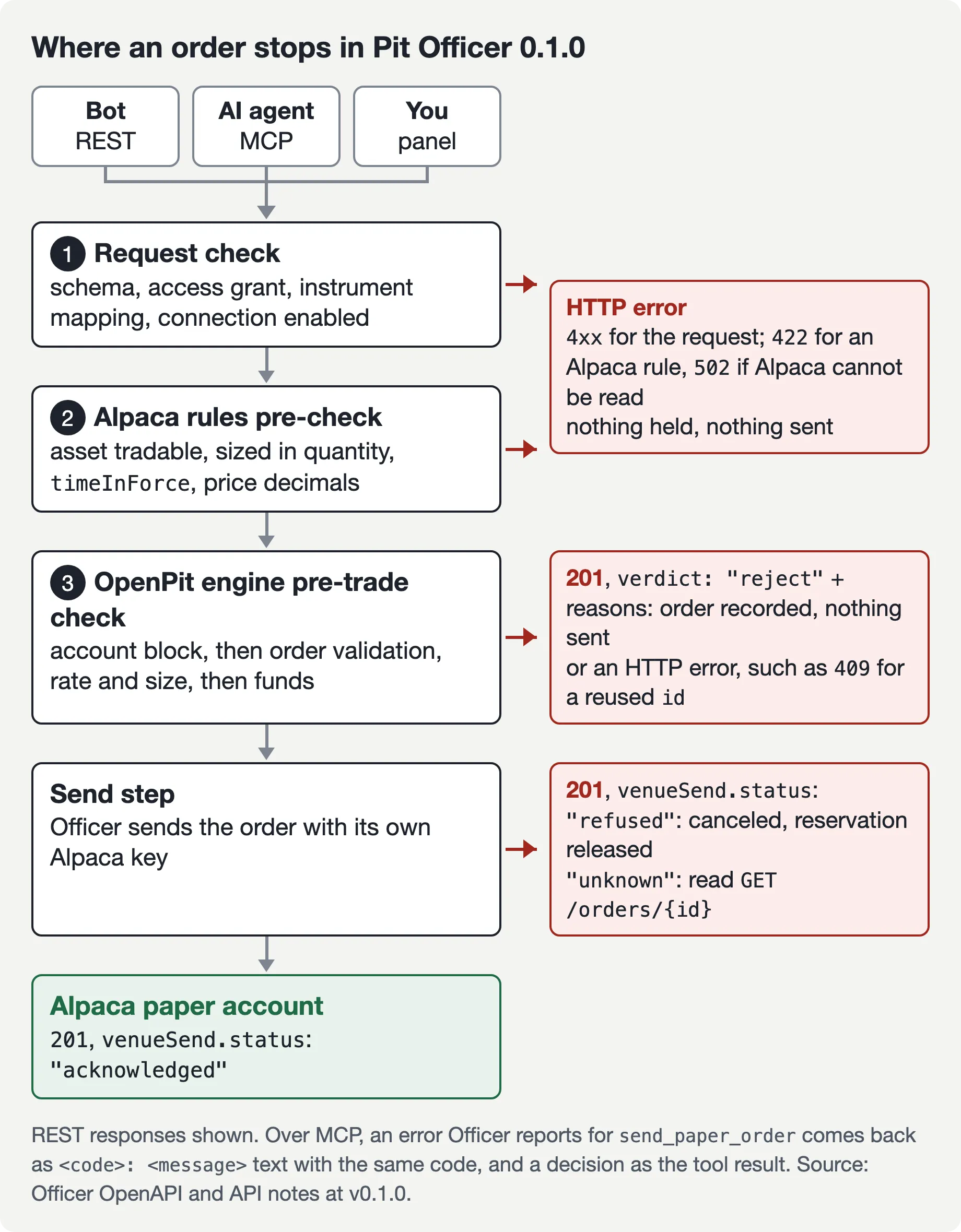
At one of three checks before Alpaca, or at the send itself; from any caller, only an order the engine accepts reaches the send.
A rejection at any of the three checks sends nothing to Alpaca. At the send, Officer reports the order refused, which is final, or unknown: the order may exist at Alpaca, or a refusal is not settled yet, so read it by its ID before you send anything that replaces it. A blind resend can create a second order, which is its own subject: duplicate orders after a timeout.
What each check stops, and what the REST call answers
The REST call that sends an order, POST /api/v1/orders/send-paper, walks the
gates in this order
(OpenAPI at v0.1.0,
sendPaperOrder and VenueSend):
- Request. Stops the order when the body breaks the schema, the account has no grant on the connection, the instrument is not mapped, or the connection is disabled. You get an HTTP error; no order is held; nothing reaches Alpaca.
- Alpaca rules. Stops it, for example, when the asset is inactive or not
tradable, the order is not sized in quantity,
timeInForceis missing or not allowed, a fractional equity order is notday, or an equity limit price has more than 2 decimal places (4 below 1 USD). You get422with the venue’s reason, or502if Alpaca cannot be read; no order is held; nothing reaches Alpaca. - Engine. Stops it when a policy rejects it or the account is blocked. You
get
201withverdict: "reject"andreasons, and novenueSend; nothing reaches Alpaca. - Send. Alpaca refuses it, Officer provably did not hand it over, or the
outcome cannot be established. You get
201withvenueSend.statusrefusedorunknown; at Alpaca the order was refused or never received, or its fate is unknown.
The Alpaca rules gate reads the venue’s own asset data: US equities and crypto
only, timeInForce one of day, gtc, opg, cls, ioc, fok, and for
crypto only gtc or ioc
(alpaca.go at v0.1.0).
Catching these before the engine reserves anything means an order Alpaca would
refuse anyway does not hold buying power on the way.
Refused, unknown, and why you send your own ID
refused is definitive: either Alpaca refused the order or Officer provably
did not hand it over, and either way the order is recorded canceled with
nothing left open and its reservation released. unknown is not a refusal:
the call could not establish or record the outcome, so the order may exist at
Alpaca, or Alpaca refused it but the cancellation is not recorded yet or could
not be confirmed. Read GET /api/v1/orders/{id}, which the API notes name as
authoritative, before you send anything that replaces it; Officer’s runtime
keeps reconciling every order that reached the send step
(API notes, Trading).
That lookup needs the order’s id, and a caller that lost the whole response
never saw a server-generated one, so send your own id and record it before
the call, as the first order below does; a reused id is refused with 409.
Which limits can you set in 0.1.0?
Four kinds, kept by Officer; the engine applies each one you configure to a new order that reaches its check.
- Order rate. At most so many order attempts in a time window, per account exactly; broker-wide or per settlement asset up to twice as many can pass at a window boundary. Rejected attempts that reach the rate check count too, so a bot that retries fast keeps its window full. It caps a runaway loop.
- Order size. A cap on quantity per underlying asset or on notional per settlement asset, broker-wide or per account. It stops a quantity bug or a fat-fingered order.
- Spot Funds P&L bounds. A lower bound, an upper bound or both on an account’s realized P&L, globally, per account group or per account. When the P&L is outside a bound you set, or its calculation has halted, the engine rejects the account’s new orders; a fill that gets it there blocks the account.
- Block. An account or a group you block: the engine rejects every new order from it before any policy runs.
The block is the piece the crashed-bot article asked for: a halt that does not live in the bot’s process. Officer stores it in its own database, so a bot that crashes and restarts comes back to an account still blocked until you unblock it. The block gates new orders only: nothing in the 0.1.0 documentation says Officer cancels working orders or closes positions when your bot dies, so the venue timers and the second-process watchdog from that article still apply.
The four limits in the API
- Order rate (
PUT /limits/rate): passes at mostmaxOrdersorder attempts perwindowMsmilliseconds; every attempt that reaches the rate check counts, rejected ones included. Broker-wide and per settlement asset it counts in an approximate fixed window that can let up to twicemaxOrdersthrough at a window boundary; per account, and per account and settlement asset, in a precise sliding one (OpenPit rate-limit policy at v0.10.0). A request refused before the engine check, at the request or Alpaca rules gate, is not counted. - Order size (
PUT /limits/order-size):maxQuantitykeyed on the underlying asset,maxNotionalkeyed on the settlement asset, broker-wide or per account. An order over the quantity cap alone is rejected byOrderSizeLimitPolicywith reason “order quantity exceeded”, which Officer reports as codeorder_qty_exceeds_limit(OpenPit wiki, Policies, 2026-10-27, Officer reject codes at v0.1.0). - Spot Funds P&L bounds (
PUT /limits/spot-funds-pnl-bounds): alowerBound, anupperBoundor both in one currency, globally, per account group or per account, on the account’s realized P&L, which the engine builds from reconciled fills and fees. Its policy name in the API isspot_funds_pnl_bounds_kill_switch(OpenPit wiki, Spot Funds, 2026-10-27, Account Blocking, 2026-10-27). - Block (
POST /accounts/{code}/blockwith areason, and the same on a group): a blocked account, or any member of a blocked group, is rejected before any policy runs. The account’sblockedfield reports whether the account or its group is blocked; an unblocked account can still fail on a missing grant, funds or a limit.
Officer stores the block with the account on the pit-officer-data volume
(schema at v0.1.0),
and clearing it is an explicit unblock.
How do you send a first order through Officer?
Start it, finish the setup, describe what you trade, fund the account, set one limit, and send one order over REST.
- Start Officer with the README’s Docker command, pinned to the 0.1.0 image: the README’s own tag follows the newest stable release.
- Finish the first-run setup in the panel. Choose multi-account mode: on a fresh Officer, single-account mode acts only on one account it creates and refuses to create another. Choose token access to get an API token for your bot.
- Describe what you trade. A fresh Officer has nothing set up. Create the assets AAPL and USD first, because Officer will not map an instrument whose asset it does not know; then an account named desk in USD, an Alpaca connection in paper mode with your paper keys, an enabled AAPL mapping, and access for desk to the connection.
- Fund the account in Officer. The engine checks a buy against the USD balance Officer records, not Alpaca’s, and rejects an unfunded one: record no more than the venue cash you are willing to deploy.
- Set the limit: at most 100 AAPL per order on desk.
- Send the order: buy 10 AAPL at a limit of 190 USD, under an ID you recorded before the call, so you can look the order up even if the response never arrives.
- Read the decision. An order the engine accepts and Alpaca acknowledges comes back with both answers. The same order for 500 shares is a successful call too, rejected, with nothing sent to Alpaca; the panel shows the recorded rejection and its reason.
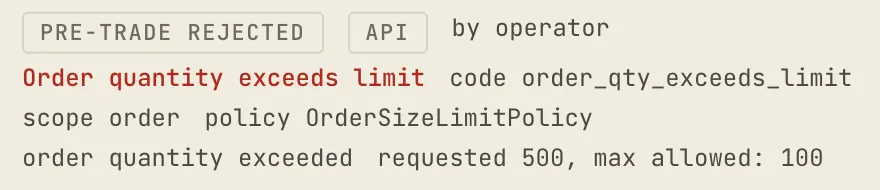
Branch on the verdict, not on the HTTP status: a risk reject is a decision, not an error. To test a limit without sending anything, Officer’s order check takes the same order economics and answers whether they would pass and, if not, why; it records and reserves nothing.
The commands, request bodies and responses, step by step
-
Start Officer with the README command, pinned to the release: the README’s
latesttag follows the newest stable release,0.1.0stays on this one.docker run -d --name pit-officer --restart unless-stopped -p 127.0.0.1:8787:8787 -v pit-officer-data:/data ghcr.io/openpitkit/officer:0.1.0docker ps --filter name=pit-officershows(healthy)when the panel answers; that says nothing about whether anything is set up yet. -
Finish the first-run setup at
http://127.0.0.1:8787/setup: welcome, accounts, encryption, approval signing, access, connecting your AI agent, done. Until it is finished,/api/v1and/mcpanswer503 setup_required. Single-account mode acts only on the account it creates,default(API notes, Single-account mode). -
Describe what you trade: the assets
AAPLandUSD, the accountdeskwith currencyUSD, the Alpaca connection inpapermode, theAAPLmapping and the access grant. Officer refuses an instrument mapping whose asset it does not know, and never creates one itself (quickstart, What comes next). -
Fund the account. An unfunded buy is rejected with
insufficient_funds(engine test at v0.1.0). The size and rate limits run first, and the funds check only for an order that passes them (OpenPit wiki, Policies, 2026-10-27), so the deposit is what lets the 10-share order through. Officer 0.1.0 does not read the Alpaca balance: each buy is checked against the USD balance this deposit seeds, not against Alpaca’s. 100,000 USD covers the 1,900 USD first order. Record it withPOST /api/v1/accounts/desk/adjustments?missingAccount=reject, in the body shape the tag’s integration test uses:{ "type": "deposit", "asset": "USD", "averageEntryPrice": "1", "realizedPnl": "0", "balance": {"mode": "absolute", "value": "100000"} } -
Set the limit with
PUT /api/v1/limits/order-size?missingAccount=rejectand this body:{ "scope": "account_underlying_asset", "account": "desk", "asset": "AAPL", "maxQuantity": "100", "maxNotional": "" } -
Send the order. With one enabled paper connection available to
desk,destinationneeds only the Alpaca route; quantities and prices are exact decimal strings, not floats.pricemakes it a limit order; without it the order is a market order, which the funds check prices off a live mark quote and rejects when Officer has none. Theidis yours.# Body shape as in TestTradingSendPaperEndToEnd at v0.1.0, which sends it # over REST to a stub Alpaca. curl -s http://127.0.0.1:8787/api/v1/orders/send-paper \ -H "Authorization: Bearer $PIT_API_TOKEN" \ -H "Content-Type: application/json" \ -d '{ "id": "desk-0001", "account": "desk", "baseAsset": "AAPL", "quoteAsset": "USD", "side": "buy", "amountKind": "quantity", "amountValue": "10", "price": "190", "destination": {"route": {"timeInForce": "day"}} }' -
Read the decision. When the engine accepts the order and Alpaca acknowledges it, the response carries both answers (angle brackets mark values your call returns):
{
  "id": "desk-0001",
  "verdict": "accept",
  "signedApproval": "<unsigned envelope>",
  "keyId": "",
  "venueSend": {
    "status": "acknowledged",
    "venueOrder": {
      "connection": "<connection id>",
      "venueAccount": "<venue account>",
      "route": {"timeInForce": "day"},
      "clientOrderId": "<client order id>",
      "venueOrderId": "<Alpaca order id>",
      "sendAttempted": true,
      "createdAt": "<time>"
    }
  }
}
The same order for 500 shares, sent with
"id": "desk-0002", is a successful call too,201, but with novenueSend: nothing went to Alpaca.{ "id": "desk-0002", "verdict": "reject", "signedApproval": "<unsigned envelope>", "keyId": "", "reasons": [ { "code": "order_qty_exceeds_limit", "scope": "order", "policy": "OrderSizeLimitPolicy", "reason": "order quantity exceeded", "details": "requested 500, max allowed: 100" } ] }Officer maps the engine’s reject code and scope to its own names, and the policy, reason and details come from the OpenPit order-size policy (Officer mapping at v0.1.0, OpenPit order-size policy at v0.10.0). Branch on
verdict; the response fields are theSignedApprovalandVenueSendschemas. Approval signing is off on a fresh Officer, so unless you turned it on in setup,keyIdis empty and the envelope is unsigned; with signing on,signedApprovalis an Ed25519-signed envelope of the decision (quickstart, approval code at v0.1.0).
The order check is POST /api/v1/orders/check: it takes the same order
economics, without id or destination, and answers with check.passed and
the engine’s rejects.
What can an AI agent do through MCP?
Only what you enable, and never loosen its own limits.
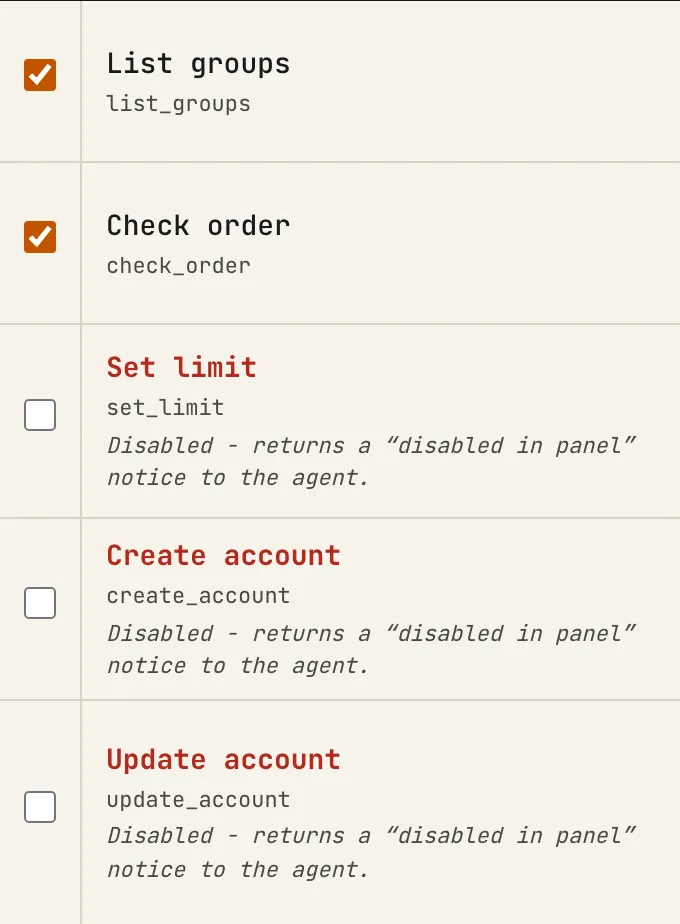
- Every tool that changes state ships disabled. Read-only tools are on; the others stay off until you enable each by name in the panel, and a call to a disabled tool is refused, not run. An agent that trades on paper needs one tool enabled: the one that sends a paper order.
- Loosening is refused over MCP. A call that would lift a block, drop or weaken a limit, or reset a rate window changes nothing; a replacement limit is stored only if it is at least as strict. Granting trading access and creating, enabling or re-keying a connection are always refused through MCP. The panel and REST are not affected.
- Every order records where it came from: the panel, REST, MCP or the system. For control-plane actions, the source comes from the surface that served the request, never from a header or body the client sends.
Unlike a limit in the prompt, this holds. An agent that reaches Officer only through MCP and has been persuaded to buy 10,000 shares can still submit that order to Officer. Once past the request and Alpaca checks, the engine rejects it on the 100-share cap, and no MCP tool raises the cap. Within the tools you enabled the agent can still send orders up to the limits; what it cannot do through MCP is move them. An agent that can also run commands on the machine is outside this guarantee, as the next section says.
The MCP tools and refusals by name
The rules are in the API notes, MCP tools.
- For an agent that trades on paper, enabling
send_paper_orderis enough;list_orders,get_limitsand the other reads are already on. In the panel’s list, reads such ascheck_orderare ticked andset_limitand the other commands that change state are not. - A call that would loosen risk state answers
loosening_refusedand changes nothing.set_limitstores a replacement barrier only if it is at least as strict as the one it replaces. - The order sources are
panel,api,mcpandsystem(Audit source).
What does it cost, and what does 0.1.0 not do?
The costs come with the design, and the gaps come with a first beta.
- The bot must give up the broker keys. If it keeps its own Alpaca key, it can send around Officer, and none of the limits apply to those orders.
- Officer becomes the only road out. When it is down, the bot cannot send: the safe failure, but a failure. Orders already at Alpaca stay there.
- No cancel or replace through Officer. A working order is canceled at Alpaca, from its dashboard or with keys held apart from the bot; prefer immediate-or-cancel or day orders while this holds.
- Two more requests per order. Officer looks the asset up at Alpaca twice before each send, which also spends your Alpaca rate limit; measure the latency yourself.
- Loopback by default. A bot on another host needs a wider bind, only with token access on, and the address it uses for Officer on Officer’s allowed list.
- Tokens are not a boundary against your own machine. Software that runs commands as you, or controls Docker, gets past them.
- Credentials are stored in plain text without a master key. With one, a sealed database whose key is lost never opens again.
- Alpaca paper trading only. And no database migration between versions.
The details behind each cost
- Keys. Move the Alpaca keys into the trading connection and give the bot an Officer API token instead.
- No cancel or replace. At 0.1.0 Officer’s cancel route refuses a
venue-linked order with
409 venue_order_managed(API notes, Trading). Cancel at Alpaca from its dashboard or with keys held apart from the bot; preferiocordayorders. - Only road out. Watch the health check and decide in advance who restarts Officer.
- More hops. A local HTTP call and an engine check sit in front of every
send, and Officer calls
GET /v2/assets/{symbol}at Alpaca twice, in the pre-check and again just before eachPOST /v2/orders: two more remote round trips, and two more requests against your Alpaca rate limit, per order (alpaca.goandruntime.goat v0.1.0). This release publishes no latency figure; measure it before you put a latency-sensitive strategy behind it. - Loopback. The panel, REST and MCP are reachable from the computer that
runs Officer. A wider bind is what the configuration reference calls a
deliberate operator decision; widen it only in token mode, because
openmode asks no surface for credentials. A bot that reaches Officer by another name - another host’s address, a container service name, orhost.docker.internalfrom its own container - needs that name inPIT_OFFICER_ALLOWED_HOSTS(configuration reference, Allowed hosts). - Tokens. Software that can run commands as you, or control Docker, gets past the token and the panel password, and the stdio MCP server asks for no credentials at all (quickstart, configuration reference).
- Master key. Trading credentials, the access tokens and a signing key are
sealed only when you supply a key through
PIT_OFFICER_MASTER_KEYorPIT_OFFICER_MASTER_KEY_FILE; that key is not recoverable, and a sealed database without it never opens again (Master key). - Paper only. Alpaca is the one trading connection, for US equities and
crypto, sized in quantity. The API sends to paper, and creating a live
connection is refused with
live_trading_unavailable(OpenAPI at v0.1.0, connection code at v0.1.0). - No migration. The configuration reference says so directly. Keep your accounts, limits and mappings reproducible rather than treating the beta’s database as permanent.
Checklist
- The bot holds no broker key; Officer’s trading connection does.
- A person can cancel a working order at Alpaca without the bot.
- Officer runs on the bot’s machine, or its bind and allowed hosts are a decision you wrote down.
- Each account the bot trades has an order-size cap and a rate limit.
- Your code branches on the verdict and on the send status, and treats an unknown outcome as “read the order”, never as “resend”.
- An agent has the paper-order tool and nothing else that changes state, and never the API token.
- You have blocked the account from the panel, watched the bot’s next order come back rejected, and unblocked it.
- Your bot sends its own ID with every order and records it before the call.
- You have stopped Officer and seen what your bot does when it cannot send.
- A master key is set and stored somewhere other than the machine, or you accepted plain-text credentials knowingly.
What else do people ask?
Does Officer replace the limits in my bot?
It replaces the ones that must hold when the bot is wrong: size, rate, a block, and a kill switch on realized P&L. An open position’s loss is not bounded by Officer at 0.1.0, so stops stay in the bot or at the venue. Checks that need the strategy’s own state, such as not re-entering after a stop, stay in the bot. Officer sees each order, not the reason the bot sent it.
Can an AI agent change its own limits through MCP?
It can tighten them if you enable the tool, never loosen them. Officer refuses
any MCP call that would lift a block, weaken a barrier or reset a rate window
with loosening_refused, and it refuses trading-access grants and connection
changes through MCP outright. Those changes go through the panel or REST.
What happens to my orders if Officer stops?
Orders Alpaca already accepted stay at Alpaca and can still fill; Officer
0.1.0 cannot cancel them, running or not, so cancel them at Alpaca. New orders
cannot be sent until it is back, because the bot no longer holds a broker key.
When it is back, GET /orders/{id} with the id you recorded before the send
is the answer for any order whose outcome you did not see.
Which brokers does Pit Officer 0.1.0 support?
Alpaca, for US equities and crypto, and paper trading only: creating a live
connection is refused with live_trading_unavailable at this version.
Where to go next
- What happens if my trading bot crashes with a position open? - why a halt has to live outside the bot, and what still acts at the venue.
- Duplicate orders after a timeout - what to do with an order whose outcome is unknown.
- Pit Officer v0.1.0 release (2026-10-27) and the quickstart, API notes and configuration reference at that tag.